Best Budget Studio Monitors (From $99 to $398, Four Pairs)
The best budget studio monitors are the PreSonus Eris E3.5 pair at $159.99, which include isolation pads and cables and have high and low shelf controls for a desk position. The Mackie CR3-X pair at $99.99 is the floor. Both stop producing meaningful output around 80 Hz, so the step up to the JBL 305P MkII pair at $319.00 is the point where the low end becomes audible rather than inferred.
Definition: A budget studio monitor is a powered nearfield speaker under about $400 a pair, limited chiefly by how little low frequency energy its small woofer can move rather than by the accuracy of its midrange.
The best budget studio monitors are the PreSonus Eris E3.5 pair at $159.99, and part of the reason is that the listing includes isolation pads and cables, two things most people forget to budget for and which change what you hear more than the difference between any two pairs at this price. If $160 is out of reach, the Mackie CR3-X pair at $99.99 is the floor worth owning.
One thing needs saying before the list, because it will save some readers a hundred and sixty dollars: a budget monitor is not a small version of a good monitor. It is a speaker with a specific, knowable hole in it. A 3.5 inch woofer stops producing useful output around 80 Hz, which means the low end of your mix is a thing you infer rather than hear. That is workable. It is not the same as monitoring.
What does a budget studio monitor actually give up?
Low frequency extension, almost entirely. Everything else scales gently with price and this does not. Moving air at low frequencies requires cone area and excursion, and there is no clever engineering that lets a 3 inch driver produce 45 Hz at a useful level in a real room.
Wavelength makes the physics concrete. Wavelength is speed divided by frequency, and the speed of sound is about 1130 ft/s. So a 100 Hz tone is 11.3 feet long and a 50 Hz tone is 22.6 feet long. A cabinet eight inches across is not going to couple efficiently to either. What you get instead is the port doing what it can, and above the port tuning frequency the response falls away quickly.
Practically that means the fundamental of a low E on a bass guitar at 41 Hz is inaudible on a 3.5 inch pair, and the thump of a kick drum around 60 Hz is barely there. You hear the harmonics and your ear infers the fundamental, which is a real perceptual effect and works better than it sounds. It still means bass decisions are guesses. The instrument frequency range chart shows exactly what falls below the line for each instrument.
Which budget monitors should you buy?
Three tiers across four pairs. The beginner tier is where the money is genuinely tight. The intermediate tier is the stretch that changes what you can hear. The expert tier is the top of the budget band, and it is the tier most readers should skip in favour of treatment.
Budget studio monitor picks
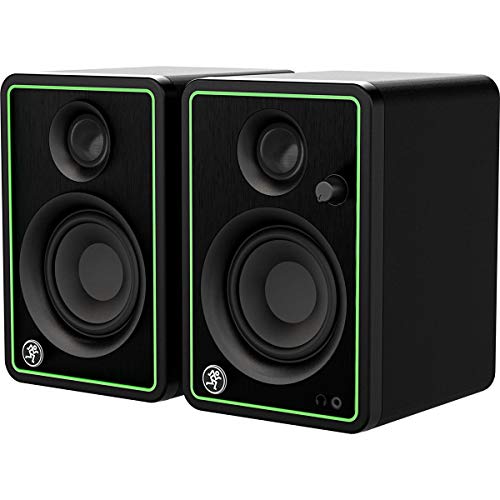
Mackie CR3-X, pair
Powered, balanced inputs, a front panel volume knob and a headphone jack for $99.99. Three inch woofers mean the low end simply is not there, and the cabinet is small enough that you will hear the port working. It is still a different category of tool from laptop speakers.
Best for: A first pair where a hundred dollars is the whole budget.
Check price
PreSonus Eris E3.5 pair, with isolation pads and cables
Three and a half inch woofers, high and low shelf controls on the back, and the listing includes isolation pads and cables, which are two things you would otherwise buy separately. Nothing meaningful below about 80 Hz, and that limit is the honest headline.
Best for: The best sound per dollar when the ceiling is under $200.
Check price
JBL 305P MkII, pair
Five inch woofers that reach usefully into the 50 Hz region, and an Image Control waveguide that widens the sweet spot more than anything else near the price. This is the pair where you stop guessing at the low end and start hearing it.
Best for: Anyone who can stretch to $319 and has treated the corners.
Check price
KRK Rokit 5 G5, pair
The G5 generation adds a DSP room correction system with 25 EQ presets chosen from a rear screen, aimed at the boundary problems a small untreated room creates. Useful, and not a replacement for absorption, which is where the same money goes further.
Best for: A fixed monitor position you know is compromised and cannot change.
Check pricePrices change often, confirm on Amazon. As an Amazon Associate we earn from qualifying purchases.
How do the budget monitors compare?
All four are sold as pairs, which makes this an unusually clean comparison. Watch the woofer column and the included-accessories column rather than the wattage figures, which manufacturers measure differently on purpose.
| Monitor pair | Price | Woofer | Useful low end | Room controls | Included |
|---|---|---|---|---|---|
| Mackie CR3-X | $99.99 | 3 in | about 90 Hz | None | Pads, cables |
| PreSonus Eris E3.5 | $159.99 | 3.5 in | about 80 Hz | High and low shelf | Isolation pads, cables |
| JBL 305P MkII | $319.00 | 5 in | about 50 Hz | HF and LF trim | Nothing |
| KRK Rokit 5 G5 | $398.00 | 5 in | about 45 Hz | DSP correction, 25 settings | Nothing |
The interesting row is the third one. Going from 3.5 inch to 5 inch woofers costs $159.01 and buys roughly 30 Hz of extension downward, which happens to be exactly the region where bass guitars and kick drums live. That is the only step on this page that changes what you can decide, rather than how pleasant the decision is.
The way I actually work around a monitor that stops at 80 Hz, on the occasions I have to, is to stop trusting it in that region entirely and check the low end somewhere else. A pair of open back headphones, a phone speaker for the opposite reason, and a car if one is available. A mix that survives a car, a phone and a pair of headphones is a mix that will survive most rooms. What ruins records is not the missing octave, it is pretending you can hear it: turning up a kick you cannot actually hear until it is 6 dB too loud everywhere else. If the monitor cannot show you 50 Hz, put a spectrum analyser on the master and treat it as an instrument reading rather than an opinion.
Where should the first hundred dollars go instead?
There is a real argument that at this budget the speakers are the wrong purchase. Three things beat a monitor upgrade almost every time.
- Isolation, at $45.19. Auralex MoPAD pads decouple the cabinet from the desk and tilt the tweeter toward ear height. A monitor flat on a desktop turns the desk into a mirror, and the delayed reflection comb filters right through the low mids. This is audible on a $100 pair and on a $2,000 pair equally.
- Corner absorption, at $106.99. LENRD corner traps work on every room mode at once, because a corner is where every mode has a pressure maximum. This is the purchase nobody wants to make and the one that changes the most.
- Headphones, at $159.99. A pair of open backs like the DT 990 PRO takes the room out of the equation completely, which in a bare bedroom is worth more than any speaker upgrade.
Run your dimensions through the room mode calculator and the acoustic treatment calculator before deciding. If your room has two modes landing near the same frequency, treatment is not optional and no monitor on this page will rescue it.
How should budget monitors be positioned?
The same rules as any monitor, and they matter more here because a small speaker gets a larger share of its low end from boundary reinforcement. Form an equilateral triangle: monitor spacing equals the distance from each monitor to your head, so a 4 foot spacing puts your head 3.46 feet behind the plane the monitors sit in. Get the tweeters to ear height. Toe them in at your listening position. Keep at least 12 inches between each cabinet and the side wall.
Then use the shelf controls. Both the Eris and the JBL have them and almost nobody touches them. A monitor pushed close to a wall gains several dB of low frequency reinforcement, which on a small speaker sounds like an improvement and is actually a lie you will mix against. The speaker placement calculator gives the numbers for your room, and how to position studio monitors walks through the mirror trick for finding your reflection points.
Who should not buy the expert tier?
Do not buy the KRK Rokit 5 G5 pair at $398.00 expecting the DSP room correction to replace acoustic treatment. It cannot, and the reason is physical rather than a matter of processing power. Boundary EQ compensates for predictable reinforcement, the bass lift you get from putting a speaker near a wall. What it cannot fix is a cancellation, because if the room is subtracting energy at 62 Hz through a modal null, boosting 62 Hz just sends more energy in to be cancelled again, and the only thing you have added is excursion and distortion.
Concretely, if your budget is $398 and your room is bare, buy the JBL 305P MkII at $319.00 and put the remaining $79 toward a 2 inch panel for a first reflection point. That will change more mixes than the correction system will. Read treatment versus soundproofing so you do not spend the money on the wrong problem, and how to treat a room for recording for the order of operations.
When do you outgrow these?
The moment the corners of your room are treated and you find yourself unable to make a decision about the bass. That is the signal, and it is a specific one rather than a vague sense that better gear would help. At that point the small room monitor roundup covers the $300 to $500 band, and the 5 inch versus 8 inch comparison explains why bigger is only better in a room large enough to support it. Check yours against the monitor size by room size chart first.
And if you want the whole chain costed rather than one category at a time, the beginner build puts monitors, an interface, a microphone and first treatment together with a running total, which is a more useful starting point than four separate roundups.
Full reviews of the monitors here
The JBL 305P MkII review covers what Boundary EQ actually fixes and the tweeter hiss worth knowing about before ordering, and the Yamaha HS5 review covers the flatter and less forgiving alternative. Both include the sourced specifications and the honest weakness in its own section.
Frequently asked questions
What are the best budget studio monitors?
The PreSonus Eris E3.5 pair at $159.99, because the listing includes isolation pads and cables and the high and low shelf controls let you compensate for a desk position. The Mackie CR3-X pair at $99.99 is the floor if $160 is out of reach. Both stop around 80 Hz, so neither will tell you the truth about bass, and neither pretends otherwise.
Are cheap studio monitors better than good hi-fi speakers?
For mixing, usually yes, and the reason is not accuracy. It is that a studio monitor is designed for nearfield listening at a metre or so, with a flat-ish response and no deliberate voicing. Hi-fi speakers are tuned to sound pleasant, which is exactly wrong when your job is to hear problems. A cheap monitor that is honest beats an expensive speaker that flatters.
How low do budget studio monitors actually go?
A 3 inch woofer is effectively done by 90 to 100 Hz and a 3.5 inch woofer by about 80 Hz. That means the fundamental of a bass guitar low E at 41 Hz and a kick drum thump around 60 Hz are simply not being reproduced. You will hear the harmonics and infer the fundamental, which works better than it sounds and is not the same as hearing it.
Should I buy budget monitors or better headphones?
Headphones, if the room is untreated and you cannot change that. A $160 pair of monitors in a bare room shows you the room, while a $160 pair of open back headphones removes the room from the equation entirely. Monitors become the better purchase the moment you have corner absorption and first reflection panels, because then they can tell you about the low end.
Do budget studio monitors need isolation pads?
Yes, and it is the highest-value forty five dollars on this page. A monitor sitting flat on a desk uses the desktop as both a reflector and a resonator, sending a delayed copy of the sound back at you and comb filtering the low mids where vocals and guitars live. Pads decouple the cabinet and tilt the tweeter toward ear height. The Eris E3.5 listing includes them.
Is it worth paying $319 for JBL 305P MkII instead of $159 monitors?
If the corners of your room are treated, yes, because 5 inch woofers reach usefully into the 50 Hz region and 3.5 inch woofers do not reach it at all. If the room is bare, spend the $159 difference on two corner bass traps first. Better monitors in an untreated room mostly buy you a more detailed picture of the room rather than of the mix.
Working out your own room and signal chain? The Home Studio Build Planner is the paid version of these pages: 8 printable worksheets you fill in with your own numbers, plus the full PDF, $29.